|
|
|
|
|
It is possible that the download link provided above does not refer to the intended version.
If you are looking for Gantt Chart, you may try searching for a download link using
Google.
This software was checked for viruses 3 months ago and was found to contain no viruses.
Click here
to see antivirus report.
|
|
| |
|
Review
This is official description applies to version 3.0
The Gantt Chart is a modern and extremely easy-in-use project plan system. This system allows you to specify complex tasks sequences - a task or multiple tasks can be required to be completed before other tasks can be started. This modern and extremely handy program makes project management a real pleasure. It allows any specialist to create a profile to run a personal schedule. The program enables users to switch between profiles to view the schedule of any staff member, it is also possible to view multiple profiles simultaneously or open the schedules of several specialists at the same time. Once you've specified a required sequence, it is automatically visualized across a horizontal timeline. Task dependency is shown via connector lines.
The following review written by one of the Software Informer contributors applies to version 2.0
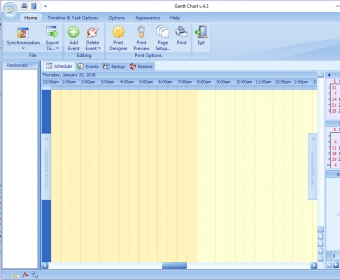
Gantt Chart is a handy calendar and scheduling tool that enables you to organize your activities and appointments in a clear way so you will never miss any of them. To create an event you double click on the day you want or go to the event tab, and complete the different fields that include subject, location, label, start and end time, task status, task complete, resource, reminder, show time as (busy, tentative, free, and out of office) and you can include a brief description. All the information you include in this program can be backed up and restored whenever you want. In the timeline and task options you can select different views for your calendar as well as different ways of marking the progress of your tasks. The program features a nice and intuitive user interface, with a customizable appearance. You can select the color scheme and personalize the quick access toolbar. What is more, you also select the display time format, work range, status labels by colors, and sound reminders. It even includes a holidays editor that enables you to edit and add holidays according to your country and mark them with different colors. Gantt Chart provides all you need to keep everything organized and tidy. |
- Synchronization with outlook and export options.
- Easy-to-use.
- Nice and intuitive user interface.
- Great print designer.
|
|
|
Reviewed by: Silvana Mansilla Reviewer rating: Reviewed: 2 years ago
|
|
Report a wrong version
Report a wrong program title
Suggest a correction
|
Screenshots
|
|
|